# Advance Networking
### **What is a VPC FlowLogs?**
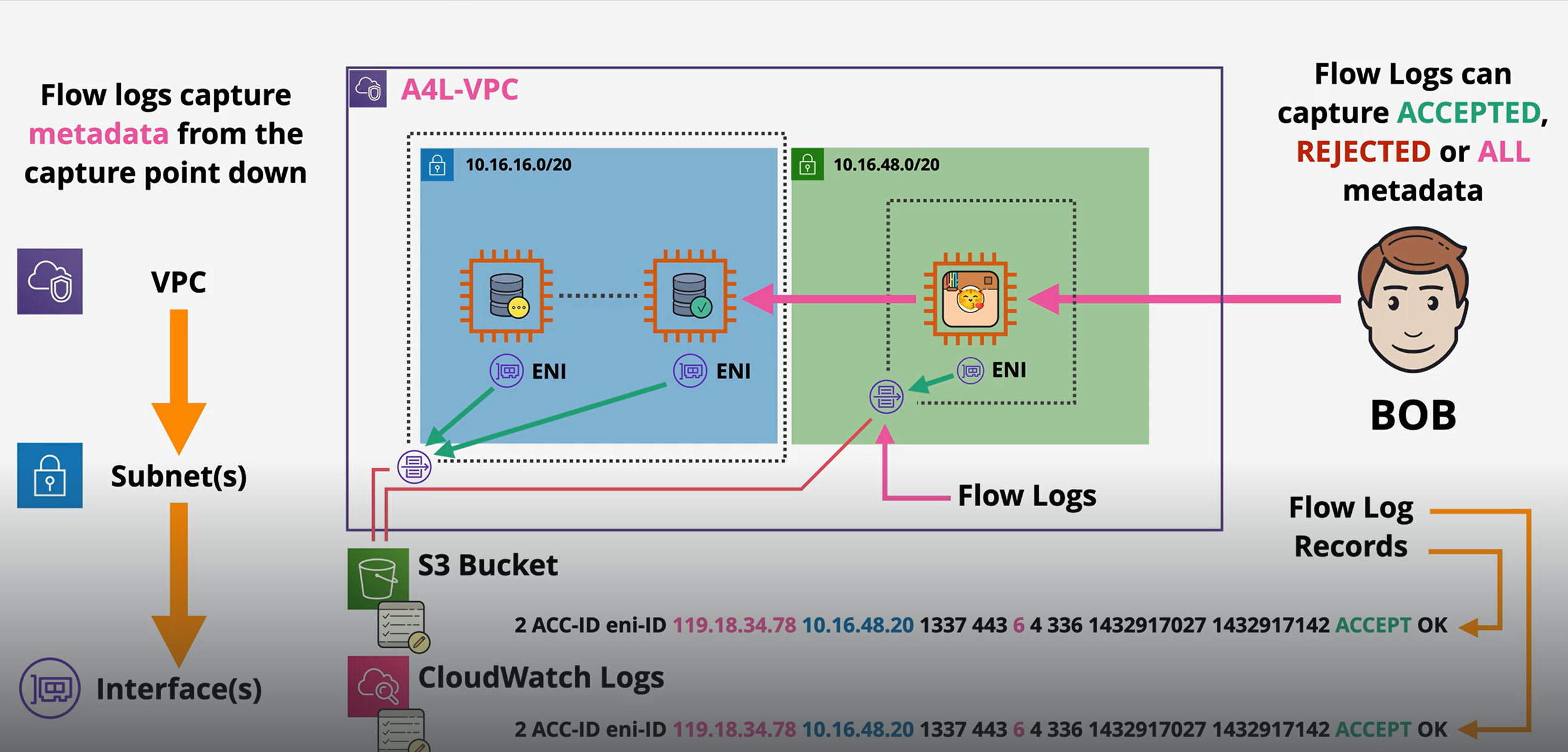
Think of VPC Flow Logs as a security camera for your network in AWS.\
They record who is talking to whom, when, and what happened inside your VPC (Virtual Private Cloud).
What do they do?
* Capture traffic details: They log info about every connection attempt in your VPC (success or failure).
* Show direction: Whether traffic was inbound (coming in) or outbound (going out).
* Show result: Whether traffic was allowed or denied by security groups, NACLs, or routing.
* Store logs: Save the logs in CloudWatch or S3, so you can analyze later.
Why do we use them?
* Security → Detect suspicious activity (e.g., someone scanning your servers).
* Troubleshooting → Find out why traffic isn’t reaching your app (maybe blocked by a rule).
* Compliance & Auditing → Prove you’re monitoring network access.
* Performance insights → Spot misconfigured routes or bottlenecks.
How do they work (simple steps)?
1. You enable VPC Flow Logs on a VPC, subnet, or ENI (network interface).
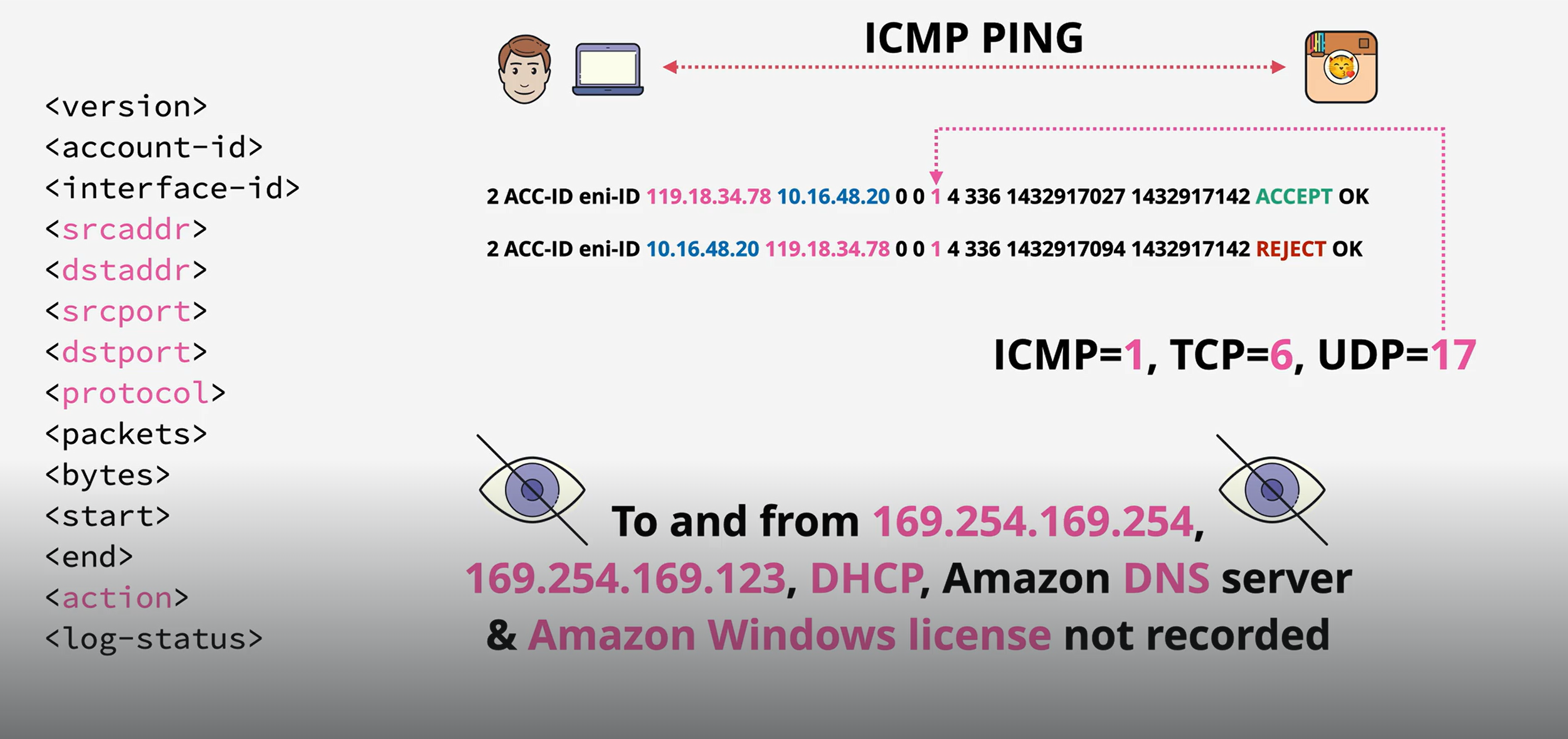
2. AWS starts recording info about every connection attempt:
* Source IP (who’s sending traffic)
* Destination IP (who’s receiving)
* Port numbers (what service, e.g., port 80 = web)
* Protocol (TCP/UDP/ICMP, etc.)
* Action (ACCEPT or REJECT)
* Bytes/packets transferred
* Timestamp
3. Logs get sent to CloudWatch Logs or S3 bucket.
4. You can then query, filter, or analyze them with tools like Athena, GuardDuty, or SIEMs.
Example
Imagine your VPC is a hotel:
* Guests = servers/instances.
* Doors = ports.
* Security guards = security groups/NACLs.
* VPC Flow Logs = visitor book where every attempt to enter/exit is recorded.
* "John (IP 1.2.3.4) tried to enter room 101 (port 80) at 10:05 AM → allowed."
* "Alice (IP 5.6.7.8) tried to enter room 202 (port 22) at 10:06 AM → denied."
VPC Flow Logs Structure
### **Egress-Only Internet Gateway**
It’s like a special internet door that allows your IPv6 instances to go out to the internet but prevents the internet from coming in.
* Egress = outbound (going out).
* Ingress = inbound (coming in).
* So, egress-only = only outbound allowed.
Why do we need it?
With IPv4, AWS uses NAT Gateways/Instances to let private subnets connect to the internet (while blocking inbound).\
But with IPv6, NAT doesn’t work the same way — so AWS made the Egress-Only Internet Gateway for outbound-only IPv6 access.
What does it do?
* Lets EC2 instances in private subnets (IPv6-enabled) connect to the internet.
* Ensures no one from the internet can start a connection into those instances.
* Works like a one-way door → you can go out, but strangers can’t come in.
How does it work?
1. You create an Egress-Only Internet Gateway and attach it to your VPC.
2. In your route table, you add a route:
* Destination: `::/0` (all IPv6 traffic)
* Target: The Egress-Only Internet Gateway
3. Now:
* Your EC2 in the private subnet can reach the internet for updates, patches, APIs, etc.
* Inbound connections from the internet are automatically blocked.
Real-world analogy
Imagine your house (VPC private subnet) has a special door:
* You can leave the house and go shopping (outbound internet).
* But nobody from outside can use that door to get inside (no inbound).
* That’s exactly what an Egress-Only Internet Gateway does for IPv6 traffic.
### **What is a VPC Endpoint?**
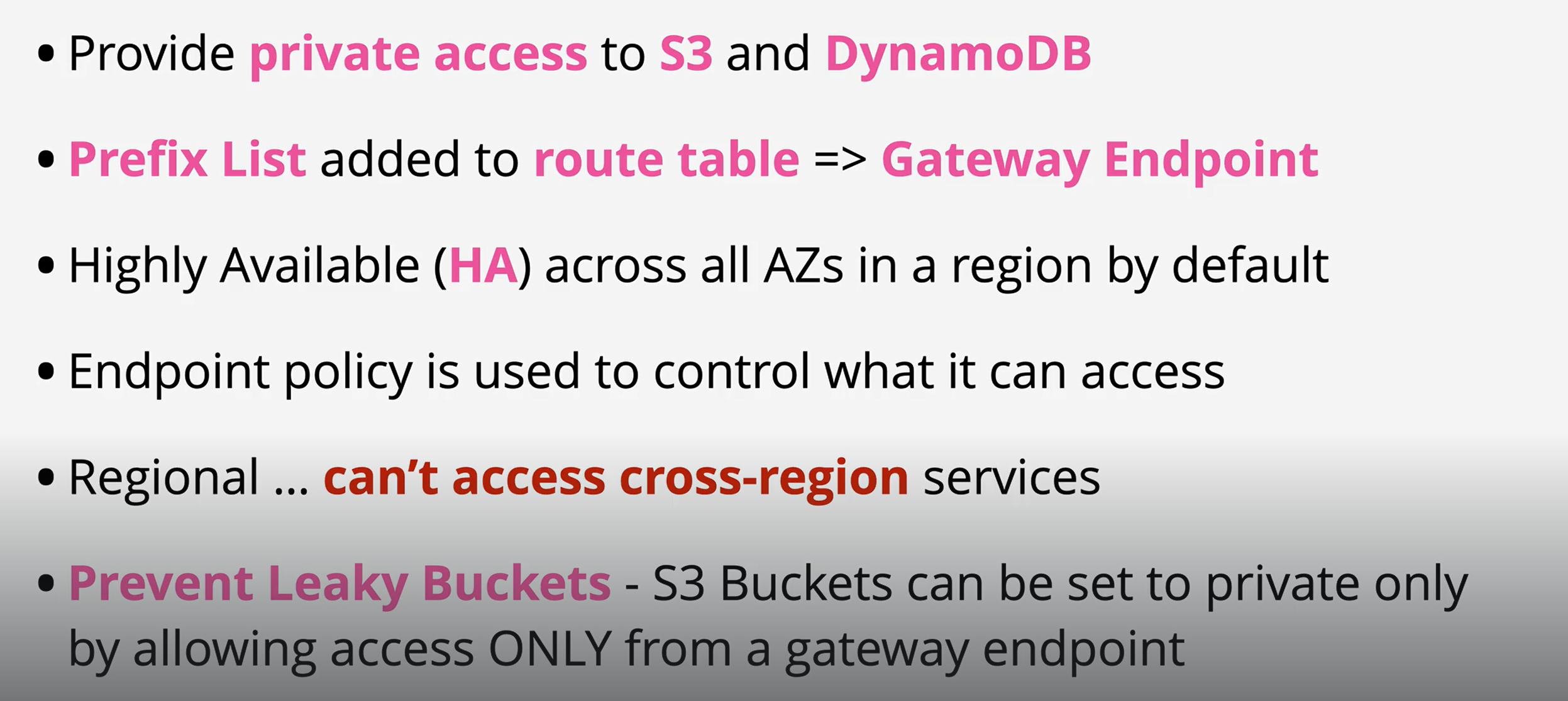
A VPC Endpoint lets your resources inside a VPC privately connect to AWS services (like S3, DynamoDB, SNS, etc.) without going through the internet.
👉 Think of it as a private tunnel between your VPC and AWS services.
Why do we need VPC Endpoints?
* Security → No traffic goes over the public internet.
* Performance → Lower latency, faster, more reliable.
* Cost → Avoid NAT Gateway/Internet Gateway data charges.
Types of VPC Endpoints
Gateway Endpoint
* Works only with Amazon S3 and DynamoDB.
* Uses the route table in your VPC → you add a route pointing to the Gateway Endpoint.
* Traffic stays within AWS’s private network.
* Cheaper (free) compared to interface endpoints.
Analogy:\
Imagine you have a special backdoor to S3 and DynamoDB directly from your house (VPC). You don’t need to go through the front door (internet).
Interface Endpoint
* Works with most other AWS services (SNS, SQS, KMS, Secrets Manager, etc.).
* Creates an Elastic Network Interface (ENI) inside your subnet.
* Your traffic goes through this private ENI to reach the service.
* Costs extra because you pay for the ENI + data processing.
Analogy:\
It’s like having a dedicated private phone line inside your house that connects directly to an AWS service office. No internet needed.
Gateway Enpoints
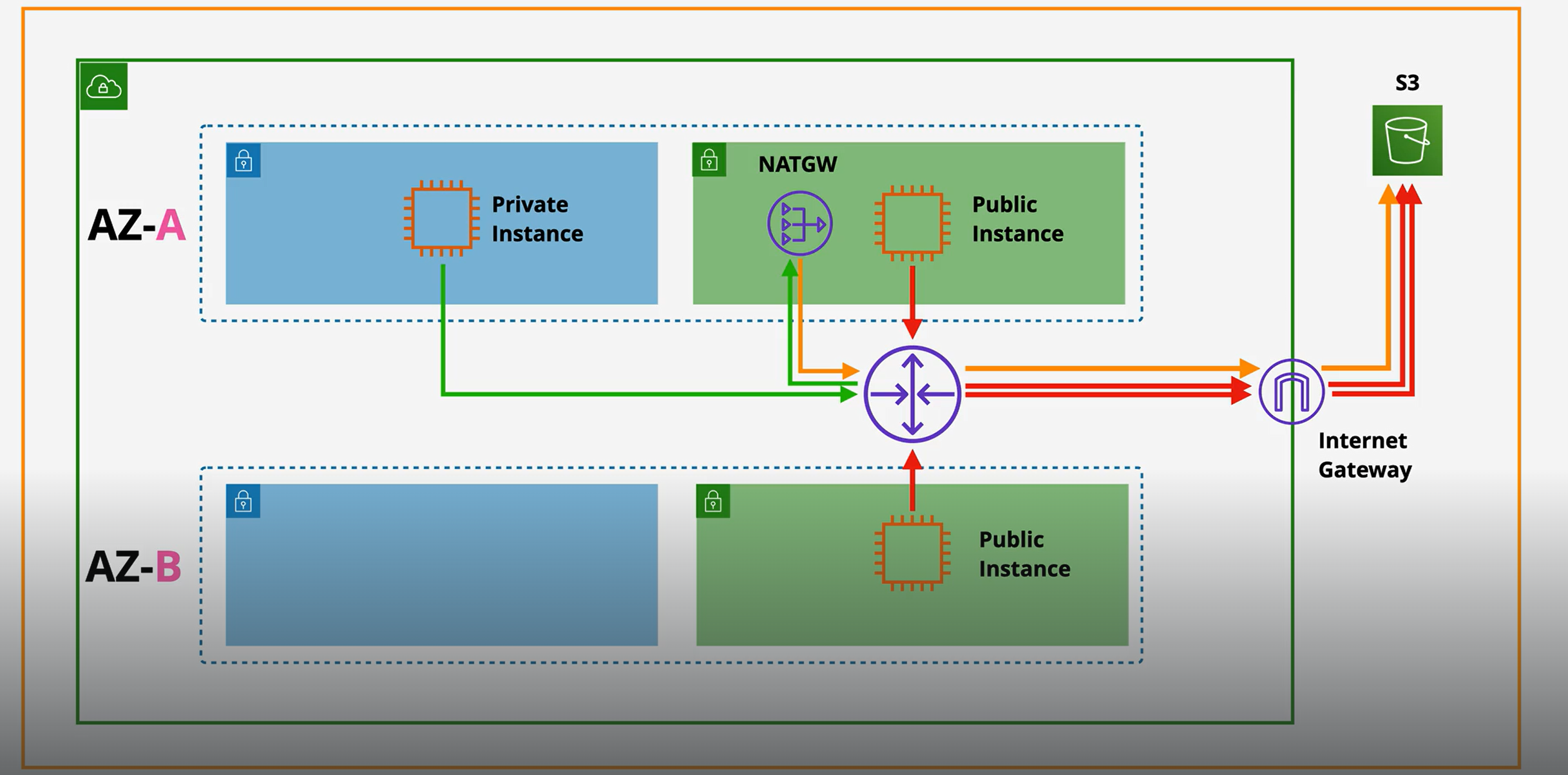
With out Gateway Enpoints
With Gateway Enpoints
Interface Enpoints
With out Gateway Interface
With Gateway Interface
### VPC Peering
VPC Peering is like making a friendship connection between two VPCs so that resources inside them can talk to each other privately using AWS’s internal network.
* It’s a one-to-one network connection between VPCs.
* Traffic never goes over the internet.
Why do we use VPC Peering?
* To connect workloads split across different VPCs.
* To share data privately between VPCs in the same region or different regions.
* To avoid using a VPN or Transit Gateway for simple connections.
How does it work?
1. You create a peering connection between VPC A and VPC B.
2. Both VPCs must update their route tables to point to each other.
3. Once set up, EC2 instances in VPC A can talk to EC2 in VPC B using private IPs.
Key points to know
* No transitive peering → If VPC A is peered with VPC B, and B with C, A cannot automatically talk to C. That means: If A ↔ B and B ↔ C exist, A cannot talk to C unless you create a direct peering between A ↔ C. Each connection is one-to-one only.
* No overlapping CIDR blocks → The two VPCs must have different IP ranges.
* Works across accounts and regions (Cross-Account, Cross-Region).
Real-world analogy
Imagine each VPC is a separate office building with private hallways (network).
* Normally, employees in one building can’t reach the other.
* VPC Peering is like building a secure hallway (private bridge) between the two offices so employees can walk over and collaborate.
* But! If a third office exists, you’d need another separate hallway (no shortcuts).
VPC Peering vs Other Options
* VPC Peering → Good for small, simple connections (point-to-point).
* Transit Gateway → Better for hub-and-spoke large networks (many VPCs).
* VPN / Direct Connect → Used when connecting your on-premises network to AWS.