# AWS Cognito
AWS Cognito is a service that helps you manage users and their login information for your apps or websites. Think of it as a “user management system in the cloud.”
Here’s what it does in simple terms:
1. Sign-up and Sign-in – It allows users to create accounts and log in securely.
2. User Authentication – It checks that users are who they say they are (like a password check or social login via Google/Facebook).
3. Access Control – It gives users the right level of access to your app or website (some users can do more things than others).
4. Token Management – It gives your app a “token” that proves the user is logged in, so you don’t have to keep asking for passwords.
Example:\
Imagine you built a mobile app. Instead of building your own system to handle usernames, passwords, and logins, you use Cognito. Users can sign up, log in with Google, and your app can safely know who they are without you storing sensitive passwords.
### **Authentication (AuthN) & Authorization (AuthZ)& User Management**
1\. Authentication (AuthN)
* What it is: Checking who a user is.
* Example: When someone logs in with username/email + password, or uses Google/Facebook login.
* Cognito Role:
* Cognito User Pools handle authentication.
* After login, it gives JWT tokens proving the user is authenticated.
2\. Authorization (AuthZ)
* What it is: Checking what a user is allowed to do.
* Example:
* A regular user can view their profile.
* An admin can view all users and modify roles.
* Cognito Role:
* JWT Access Tokens contain information about user roles/permissions.
* Your app or API reads the token to decide what the user can do.
3\. User Management
* What it is: Handling all operations related to users in your system.
* Examples:
* Creating user accounts
* Resetting passwords
* Enabling/disabling users
* Setting roles and permissions
* Cognito Role:
* User Pools act as a user management system.
* Admins can manage users from the console or API.
✅ In simple terms with Cognito:
* AuthN: “Who are you?” → Cognito verifies login.
* AuthZ: “What can you do?” → Cognito token + roles control access.
* User Management: “Manage all users” → Cognito lets you create, update, delete, and manage users.
### **User Pools**
* A User Pool in AWS Cognito is basically a database of your app’s users.
* It handles:
* Sign-up (creating accounts)
* Sign-in (logging in)
* Password reset
* MFA (multi-factor authentication) if needed
Think of it as the “login manager” for your app.
#### **JWT (JSON Web Token)**
* After successful login, Cognito gives JWTs.
* JWT is a secure token that proves the user is authenticated.
* Types of JWTs from Cognito:
1. ID Token → Information about the user (like name, email).
2. Access Token → Lets the app access protected resources (APIs).
3. Refresh Token → Lets the user get new tokens without logging in again.
Example flow:
1. User enters email + password in your app.
2. Cognito User Pool checks credentials.
3. Cognito sends back JWT tokens.
4. Your app uses Access Token to call APIs securely.
5. When token expires, your app uses Refresh Token to get a new one.
### **Identity Pools**
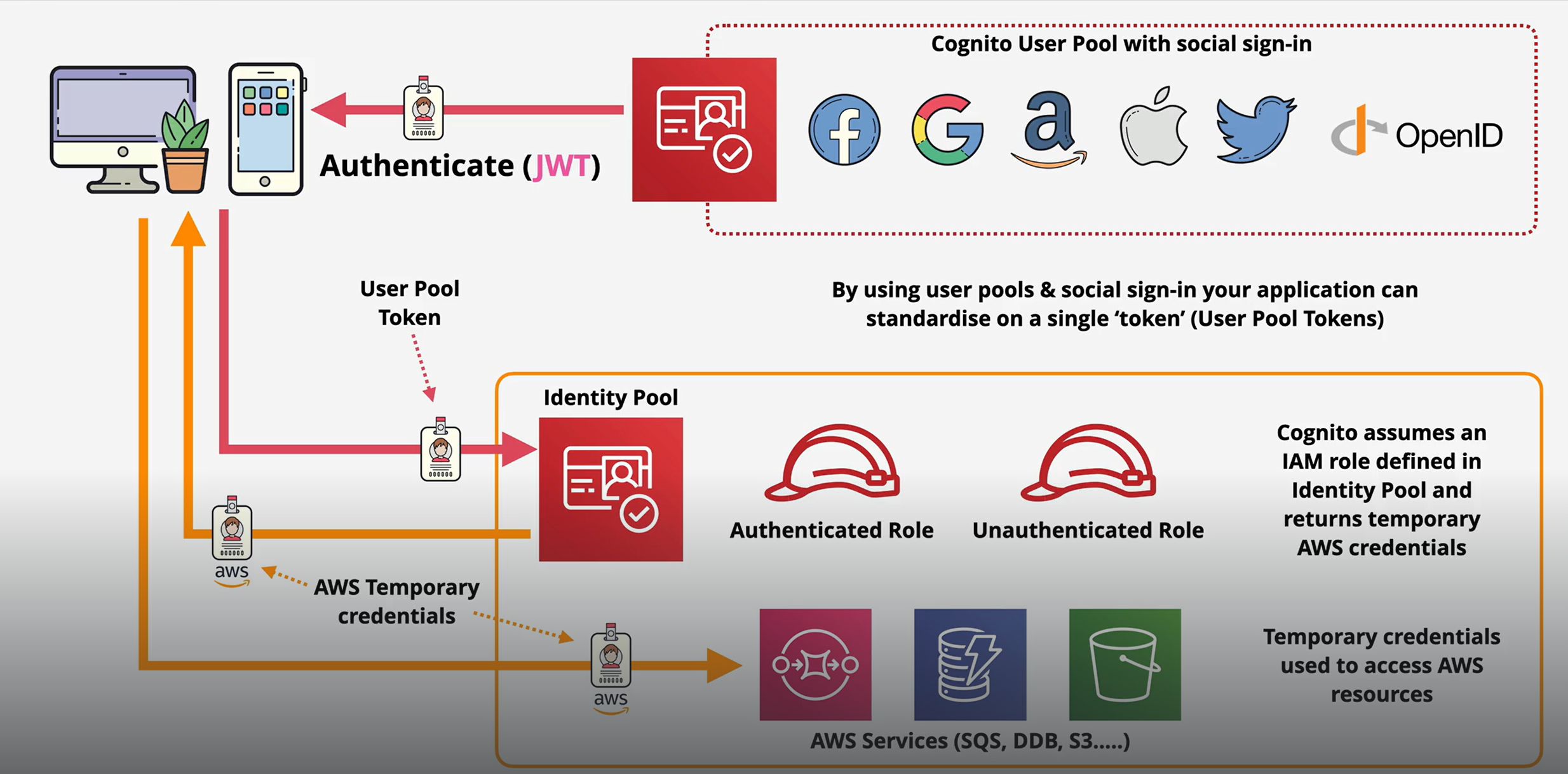
identity Pool (AuthN + Temporary AWS Access)
* Purpose: Provides temporary AWS credentials to users so they can access AWS services (like S3, DynamoDB, etc.).
* Key point: It’s not for managing users or passwords—that’s what User Pools do.
How it works
1. A user logs in through a User Pool, or via a federated identity (Google, Facebook, Apple).
2. Identity Pool takes that authenticated user and gives temporary AWS credentials.
3. With these credentials, the user can access AWS resources according to the IAM roles assigned.
Why it’s needed
* Imagine your app lets users upload files to S3.
* You don’t want to give them your AWS keys directly.
* Identity Pool gives temporary credentials with limited permissions to let the user do exactly what they need.
### **Difference from User Pool**
| Feature | User Pool | Identity Pool |
| ----------- | -------------------------------- | ------------------------------------------- |
| Purpose | User authentication & management | Temporary AWS credentials |
| Handles | Sign-up, Sign-in, JWTs | Access to AWS resources |
| Login Types | Email/username, social login | Authenticated via User Pool or social login |
| Example | Verify password and return JWT | Give temporary S3 upload access |
### **User & Identity Pools**
* Definition: Federated identities let users log into your app using an external identity provider instead of creating a new account.
* Examples:
* Google
* Facebook
* Apple
* Corporate login via SAML (e.g., Microsoft AD, Okta)
How it works
1. User chooses to log in via Google/Facebook/another provider.
2. The external provider verifies the user and gives a token.
3. AWS Cognito Identity Pool exchanges that token for temporary AWS credentials.
4. The app can now access AWS resources (S3, DynamoDB, etc.) according to the user’s assigned IAM role.
Why it’s useful
* Users don’t need to create a separate username/password for your app.
* You can leverage existing trusted identity providers.
* Works well for mobile and web apps that need access to AWS resources securely.
Key point
* Federated identities are about authentication from external providers + getting temporary AWS access.
* This is done through Cognito Identity Pools, not User Pools.